
Просмотрщик дисков коронарографии A viewer for coronary angiography discs
Открывается в браузере. Без установки, без регистрации, бесплатно. Диск от пациента читается за секунду — съёмки разложены по карточкам с углами проекции, кинопетля запускается сама. Opens in your browser. No installation, no sign-up, free. A patient disc loads in a second — every run gets its own card with projection angles, and the cine loop starts by itself.
Вы открыли страницу с телефона. Программа работает только на компьютере — диск пациента нужно куда-то вставить, а телефон не даёт браузеру доступ к папке с DICOM-файлами. Перешлите себе адрес и откройте его на рабочем компьютере. You are on a phone. The viewer works on a computer only — the patient's disc has to go somewhere, and a phone gives the browser no access to a folder of DICOM files. Send yourself the address and open it on your work computer.
Снимки никуда не отправляются. Диск читается внутри вашего браузера и остаётся на вашем компьютере. В самой программе объявлена политика безопасности, запрещающая соединение с любым узлом сети, — это исполняет браузер, а не наше обещание. Ничего не загружается и не сохраняется. Nothing is uploaded. The disc is read inside your own browser and stays on your computer. The program declares a security policy that permits no connection to any host — enforced by the browser, not by our word. Nothing is uploaded or stored.
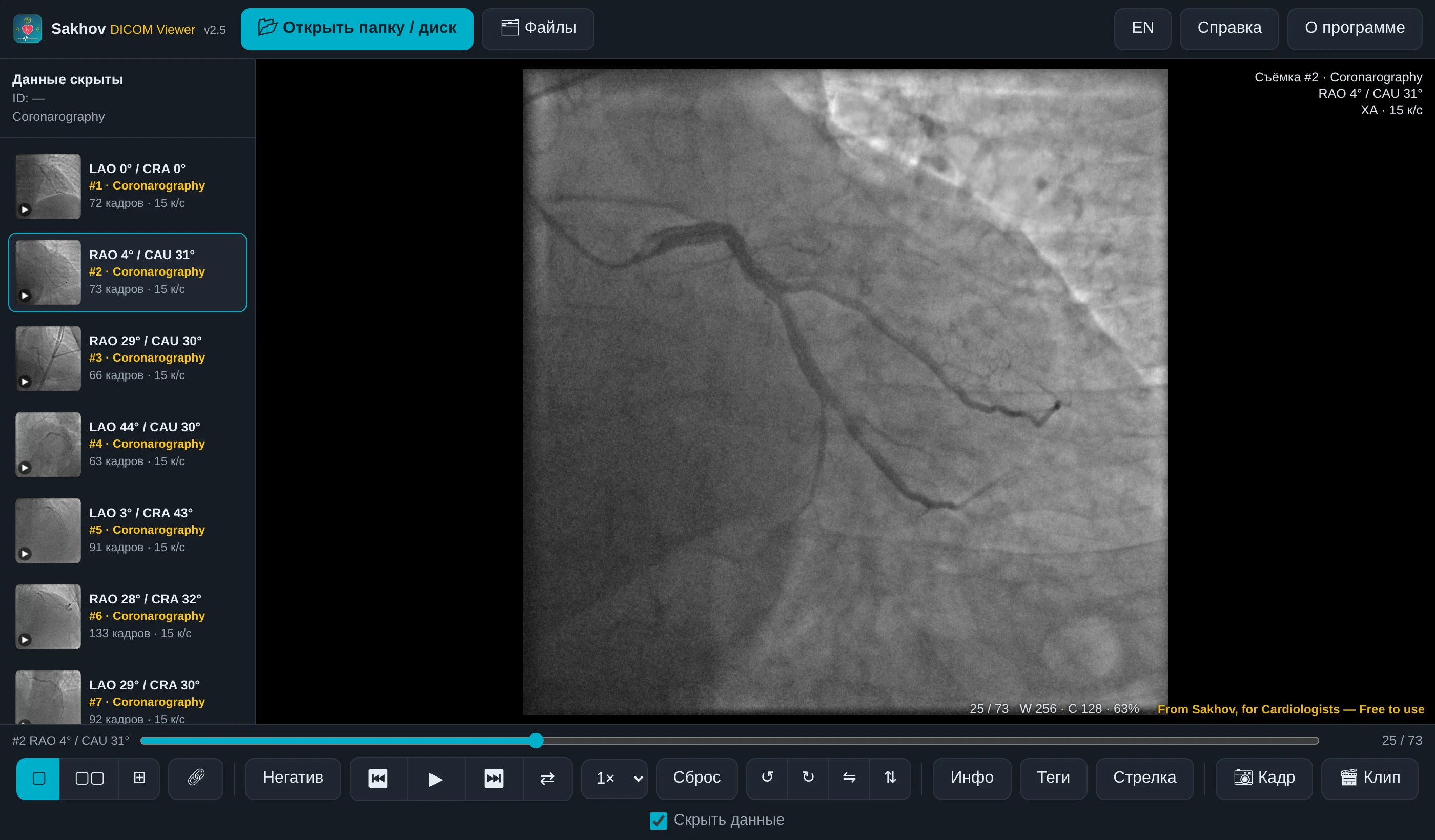
Как пользоватьсяHow to use it
- Вставьте диск или флешку пациента. Insert the patient's disc or USB stick.
- Нажмите «Открыть просмотрщик» выше — или откройте скачанный файл двойным щелчком. Click "Open the viewer" above — or double-click the downloaded file.
- Нажмите «Открыть папку / диск» и выберите диск целиком. Программа сама найдёт все DICOM-файлы; ZIP и RAR распаковываются автоматически. Click "Open folder / disc" and select the whole disc. All DICOM files are found automatically; ZIP and RAR archives are extracted for you.
- Каждая съёмка — отдельная карточка слева с углами RAO/LAO и CRA/CAU. Кинопетля запускается сама. Every run is its own card on the left, with RAO/LAO and CRA/CAU angles. The cine loop starts automatically.
Что умеетWhat it does
Съёмки, а не одна длинная серияRuns, not one long series
Диски GE, Philips и Siemens часто пишут все съёмки в одну серию. Программа разделяет их так же, как RadiAnt и Horos: каждая съёмка — своя карточка. GE, Philips and Siemens discs often write every run into a single series. The viewer splits them the way RadiAnt and Horos do: one card per run.
До и после ЧКВ рядомPre and post PCI side by side
Раскладки 1×2 и 2×2, у каждого окна свои яркость, зум и поворот. Синхронизация — кадры всех окон идут вместе. 1×2 and 2×2 layouts; each pane keeps its own brightness, zoom and rotation. Link them and all frames move together.
Для докладаFor a talk
Кадр в PNG, серия — в MP4 для PowerPoint и Keynote. Стрелка на стеноз попадает в экспорт. Флажок «Скрыть данные» убирает имя и ID отовсюду сразу. A frame as PNG, a run as MP4 for PowerPoint and Keynote. Arrows pointing at a stenosis are included. "Hide patient data" masks name and ID everywhere at once.
Открывает почти всёOpens almost anything
Несжатый DICOM, RLE, JPEG Baseline и Lossless, JPEG-LS, JPEG 2000, DICOMDIR, ZIP и RAR. Файл съёмки на 150 МБ читается покадрово и не грузится в память целиком. Uncompressed DICOM, RLE, JPEG Baseline and Lossless, JPEG-LS, JPEG 2000, DICOMDIR, ZIP and RAR. A 150 MB run is read frame by frame, never loaded whole.
ТребованияRequirements
Windows или macOS, любой современный браузер — Chrome, Edge, Safari, Firefox. Ничего устанавливать не нужно. Интернет нужен только чтобы открыть эту страницу; сама работа с диском идёт без сети. Windows or macOS and any modern browser — Chrome, Edge, Safari, Firefox. Nothing to install. The internet is needed only to open this page; working with a disc needs no network.
Подлинность копииVerifying your copy
Если вы скачали файл, сверьте контрольную сумму — так вы убедитесь, что получили неизменённую программу. If you downloaded the file, compare its checksum to make sure you have an unaltered copy.
SHA-256: 6e8b05d7580df9031e3efda0f185aaf4dfc2cebddacfc26e7a31d2d841a7635c
macOS shasum -a 256 "Sakhov DICOM Viewer v2.5.html"
Windows certutil -hashfile "Sakhov DICOM Viewer v2.5.html" SHA256
ВажноImportant
Программа предназначена для просмотра и обучения. Для официальных диагностических заключений следует использовать сертифицированное медицинское ПО. Ответственность за клинические решения несёт врач. The viewer is intended for review and education. Official diagnostic reporting requires certified medical software. Clinical decisions remain the physician's responsibility.